Open sourcing a 1.5B parameter Next-Edit Autocomplete Model
We’re open sourcing Sweep Next-Edit, a locally runnable SOTA LLM for next-edit autocompletion.
Today we’re releasing Sweep Next-Edit: a 1.5B parameter model that predicts your next code edit before you make it. It can run locally on your laptop in under 500ms, and outperforms models over 4x its size on next-edit benchmarks.
We’re open sourcing the model weights so the community can build fast, privacy-preserving autocomplete for every IDE - VSCode, Neovim, Emacs, and beyond.
Next Edit Models: Speed vs Quality
Accuracy by Task Category
Why Other Models Struggle
The poor performance of Zeta and Instinct, such as extra or missing trailing lines, stems from suboptimal formatting and tokenization choices:
- Instinct used chat template from Qwen2.5-Coder-Base for training, but these tokens are untrained in the base model. See this post for why this is problematic.
- For boundary markers, both models used
<|editable_region_start|>and<|editable_region_end|>, which tokenize poorly (7 tokens each). One of the most common failure modes is misplacing<|editable_region_end|>, leading to missing or extraneous trailing lines. Special tokens are much better suited for this use case.
- Similarly, Zeta and Instinct don’t use special tokens for multi-file context. Zeta doesn’t support multi-file context at all, while Instinct uses custom tokens rather than the special tokens Qwen2.5-Coder was pretrained on.
- Both Zeta and Instinct include excessive instructions. For example, Instinct has a system message introducing itself as “Instinct, developed by Continue” (information an autocomplete model doesn’t need). These extra tokens add noise that disproportionately affects small LLMs, and they increase latency.
SYSTEM_PROMPT = """You are Instinct, an intelligent next-edit predictor developed by Continue.dev.
...
"""Further, these models had some other suboptimal train-time design choices:
- Zeta only used a couple of hundred training data entries and Instinct only used a couple of thousand, of which the majority are from a single repository.
- Zeta used Lora. We’ve found from our testing that LoRA struggles to learn basic pattern matching, much less do next-edit autocompletes.
Our Format
According to Qwen2.5 Coder’s technical report, their pretraining format is:
<|repo_name|>{repo_name}
<|file_sep|>{file_path_1}
{file_content_1}
<|file_sep|>{file_path_2}
{file_content_2}
<|file_sep|>{current_file}
Current file prefix
<|fim_prefix|>
{prefix}
<|fim_suffix|>
{suffix}
<|fim_middle|>{completion}
This is a great for training FIM but not next-edit autocomplete. Here’s our format:
<|file_sep|>{file_path_1}
{file_content_1}
<|file_sep|>{file_path_2}
{file_content_2}
<|file_sep|>{changed_file_1}.diff
original:
{before_changes_of_diff}
updated:
{after_changes_of_diff}
<|file_sep|>{changed_file_1}.diff
original:
{before_changes_of_diff}
updated:
{after_changes_of_diff}
<|file_sep|>original/{file_path}
{contents_prior_to_most_recent_change}
<|file_sep|>current/{file_path}
{current_state_of_contents}
<|file_sep|>updated/{file_path}
{updated_state_of_contents}
The two main differences from the base Qwen-2.5 Coder prompt are:
- We provide recent changes.
- We have the model rewrite a fixed sliding window of code around the cursor.
Diff Format
We placed every recent change in its own file separator block.
We also ran a “hyperparameter sweep” over prompt formats. There are many ways to represent diffs - unified diff format, side-by-side, original/updated blocks, old/new labels, with or without .diff markers. We used a genetic algorithm to find the optimal combination.
Here’s how the genetic algorithm worked:
- Initialize population: We started with 10 prompt format variants, each with different combinations of diff representation choices.
- Evaluate fitness: For each format, we ran inference on a held-out validation set and computed exact-match accuracy.
- Selection & breeding: The top-performing formats were kept, and we created new variants by combining elements from winning formats (e.g., taking the diff markers from one format and the label style from another).
- Mutation: We randomly tweaked some formats to explore new variations.
- Repeat: We ran this for 3 generations, evaluating ~30 different prompt formats in total.
The winning format used original/updated blocks without unified diff syntax, a result that surprised us at first.
Of the final winning formats, we found this to be the simplest one.
Our hypothesis is that the original / updated format is more readable for LLMs than unified diff formats. Why, you may ask? Consider the following diff:
             if (params.length >= 8 && params[7] != null) {
-                linkState = LinkState.valueOf(params[7].toUpperCase());
+                linkState = LinkState.valueOf(params[7].toUpperCase(Locale.ENGLISH));
             }
As a human, we effectively read this on a 2D screen, so it’s easy to see the linkState declarations line up and that Locale.ENGLISH was inserted. But to the model it looks something like this:
if (params.length >= 8 && params[7] != null) {\n- linkState = LinkState.valueOf(params[7].toUpperCase());\n+ linkState = LinkState.valueOf(params[7].toUpperCase(Locale.ENGLISH));\n }This is much harder to parse visually. Further, Qwen’s technical report does not mention adding any unified diffs to the pretraining data.
So we present it to the model in the following format:
original:
            if (params.length >= 8 && params[7] != null) {
                linkState = LinkState.valueOf(params[7].toUpperCase());
            }
updated:
            if (params.length >= 8 && params[7] != null) {
                linkState = LinkState.valueOf(params[7].toUpperCase(Locale.ENGLISH));
            }
This is the same reason why Claude Sonnet prefers using str replace instead of applying unified diffs, as it’s more similar to Claude’s pretraining data, making it easier for the model to generate.
Sliding Window
For the current window, we found a fixed window size of 10 lines above and below to be optimal.
Let’s look at Instinct’s prompt format:
20 lines above changes
<|editable_region_start|>
1 line above cursor
line containing cursor
5 lines below cursor
<|editable_region_end|>
20 lines below changes
The model’s task is to rewrite the 7 lines in the editable region (highlighted).
The issue we’ve seen in evals is that the model would sometimes continue generating after <|editable_region_end|>, which would add extra irrelevant changes. The reason is likely that the model sees the 20 lines below the editable region and is eager to continue generating it. Generally, the model doesn’t comprehend the editable region well, as this is out of distribution relative to its pretraining data.
Thus, we simplified this format to the following, removing the “editable” region entirely:
10 lines above cursor
line containing cursor
10 lines below cursor
Where the model’s task is to rewrite the entire 21 lines.
The downside is that generating 21 lines is very slow. But after implementing our custom n-gram implementation and early cancellation logic in TensorRT-LLM, the average warm autocomplete ends up completing in sub-100ms.
We also originally used an AST-based algorithm to compute optimal boundaries but found that the model trains better with a fixed window size.
The intuition behind AST-based boundaries was to align the editable region with logical code structures-functions, classes, or blocks. For example, if the user is editing inside a function, we’d expand the region to include the entire function body:
def process_data(items):
    # <-- editable region start (function body)
    results = []
    for item in items:
        if item.is_valid():
            results.append(item.transform())
    return results
    # <-- editable region end
This seemed elegant in theory, but in practice it caused two problems. First, inconsistent region sizes: function lengths vary wildly. Some are 5 lines, others are 30 lines. This made training unstable since the model saw dramatically different output lengths. Second, boundary prediction errors: the model had to learn both what to generate and where the AST boundary should end. When it got the boundary wrong, the entire output was marked incorrect.
With fixed windows, the model always knows exactly how many lines to output, letting it focus entirely on generating the right content.
Training Process
Supervised Fine-Tuning
We first ran supervised fine-tuning on ~100k training entries spanning next-edit, FIM and noisy suggestion reduction on an 8xH100 for 4 hours. We scraped from the most popular permissively-licensed repos on GitHub over the past year with a commit count filter. This causes a small bias towards more recent topics such as LLM inference or MCP servers, but it does better correlate with the type of work that the average user of Sweep does. We also upsampled to match the language distribution of most Jetbrains users, like Java, Kotlin, C#, PHP, and Ruby.
However, despite training on high-quality data during SFT, we found a few undesirable habits of the model:
- The model sometimes generates code that doesn’t parse. Since the model only sees a 21-line slice of the file, it lacks context of the broader codebase and can produce code that parses locally but fails when integrated. This typically happens when the model removes necessary parentheses or other structural elements.
- The diff size is occasionally too large because fully generated files naturally tend to be more verbose than partial states (which occur while developers are actively editing). Excessive insertions and deletions are distracting to users and result in lower acceptance rates.
On-Policy Reinforcement Learning
The initial supervised fine-tuning (SFT) data is valuable for teaching the model the task in a stable way, but it’s not enough to handle all edge cases. This is where reinforcement learning (RL) comes in.
The key difference between SFT and RL is how the model learns. With SFT, the model is shown the “correct” output and trained to reproduce it exactly. This works well for learning the basic task, but the model only sees one way to solve each problem. With RL, the model generates outputs freely, and we score them with reward functions. The model learns to produce more high-reward outputs and fewer low-reward ones without being told exactly what to generate.
Why does this matter for next-edit? In SFT, if the model generates code that’s functionally equivalent but formatted slightly differently, it gets penalized. In RL, we can design reward functions that recognize multiple valid solutions, letting the model explore and find outputs that are both correct and natural.
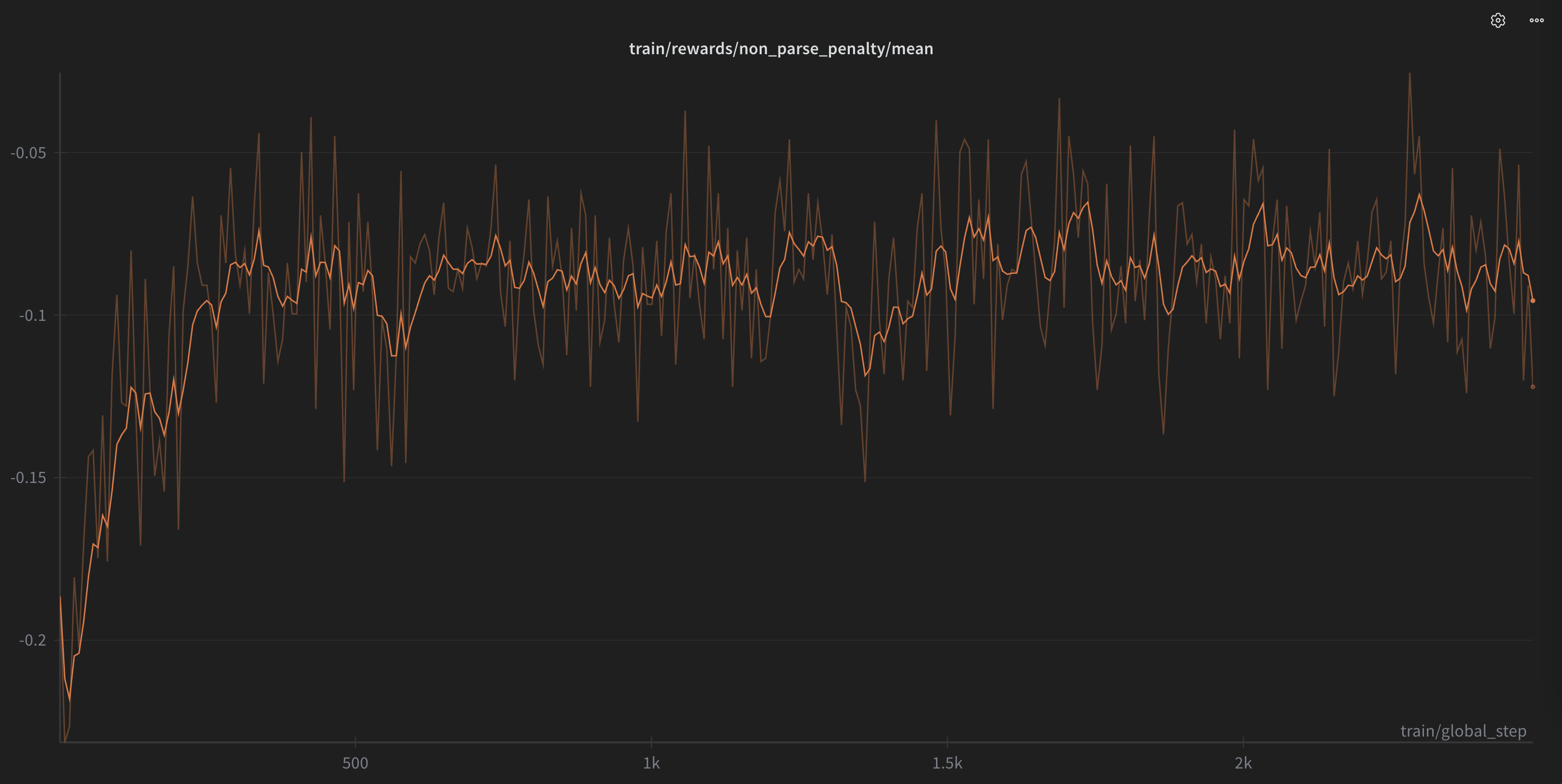
We then ran RL for another 2000 steps to remove these undesired behaviours. We added a few simple rewards:
- Check using
tree-sitterwhether the output file parses for common languages likeJava,Pythonetc., when the completion is merged into the file. - Regularization rewards, such as checking that the change is within certain bounds in size.
Try it out
The end result is a model that feels genuinely useful: fast enough that suggestions appear before you finish thinking about them, accurate enough that you trust them, and small enough to run entirely on your machine without sending code to the cloud. By open sourcing both the model and sharing these insights, we hope to save others from repeating our mistakes and help build a great autocomplete experience for all IDEs.
If you use JetBrains IDEs, we’d love for you to try out Sweep and let us know what you think. The plugin uses our custom inference engine combined with Sweep Next-Edit to provide lightning-fast and accurate next-edit suggestions as you code.
For those building their own tools, here is a minimal working example to help you get started: https://huggingface.co/sweepai/sweep-next-edit-1.5B/blob/main/run_model.py and we welcome contributions and feedback from the community. Whether you’re integrating it into VSCode, Neovim, or your own custom editor - we’re excited to see what you build!
Have questions or feedback? Reach out to us on Twitter/X or email us at team@sweep.dev.
Benchmark Details
Latency
Test Setup
- All requests are cold requests (no KV cache)
- Task: Rewriting a 21-line code span, as per our next-edit autocomplete format
- Optimization: inference on our TensorRT-LLM fork, using FP8 quantization with n-gram speculative decoding, with greedy decoding (temperature=0)
- Mercury-Coder’s latency is measured via Inception AI’s first-party API endpoint.
Input/Output
- Input: 6000±2500 tokens per request
- Output: 70±20 tokens per request
Tokens Per Second (TPS) Calculation
- TPS = average output tokens / average end-to-end latency
- Tokenization is computed via Qwen’s tokenizer
Quality
The overall score is the average of five benchmarks:
- Next-edit suggestions below the cursor - making a close change below the cursor
- Next-edit suggestions above the cursor - making a close change above the cursor
- Tab-to-jump next-edit suggestions - making a change far from the cursor
- Fill-in-the-middle (FIM) completions - completing code fragments at the cursor position
- Noisiness evals - not suggesting a change when no changes are expected
For details on how prompt formatting for each model, see the Appendix.
Evaluation Metric
All five benchmarks use whitespace-agnostic exact-match accuracy as the evaluation metric.
We intentionally chose exact-match over softer metrics like CodeBLEU or LLM-as-a-judge (used by Instinct’s evaluation). The argument for softer metrics is that there are multiple correct ways to generate the same output. However, this reasoning doesn’t hold for next-edit autocomplete.
Next-edit suggestions are highly predictable. Most suggestions are low-entropy changes—repeating the user’s last edit, fixing a typo, or completing a pattern. In these situations, there’s usually only one correct answer, and the model needs to nail it consistently for users to trust the autocomplete.
“Almost correct” suggestions are often worse than no suggestion. When a model generates code that’s 90% right, the user still has to manually fix the remaining 10%. This interrupts their flow and can be more frustrating than having no suggestion at all. Partial credit doesn’t reflect the actual user experience.
Here’s a concrete example from our benchmark that illustrates why exact-match matters:
Appendix
Prompt Construction
- Zeta and Instinct: we copied their prompts from the examples in their respective datasets (Zeta, Instinct).
- We’ve found that Instinct repeats itself indefinitely ~10% of the time. This is likely due to forgetting to generate EOS token.
- Mercury Coder: we used their API for evals using their recommended format under https://docs.inceptionlabs.ai/capabilities/next-edit. We hit a lot of error 500s, but our best run hit error 500s around ~5%.
- We considered these error 500s as no changes made, since this is what we would show to users in production for runtime errors.
- Qwen base: we used the following prompt format:
<|im_start|>user
Here are contents of the user's file before any changes were made:
<current_file>
{original_file}
</current_file>

The user recently made the following changes:

<recent_changes>
{recent_changes}
</recent_changes>

Here's the section to edit:

<code_block>
{current_section}
</code_block>

Rewrite <code_block> to help the user finish writing their changes. Respond with only the updated contents of the <code_block>, wrapped in the XML tags.<|im_end|>
<|im_start|>assistant
I have inferred the user's intentions and will fully implement the user's changes.

<code_block>